
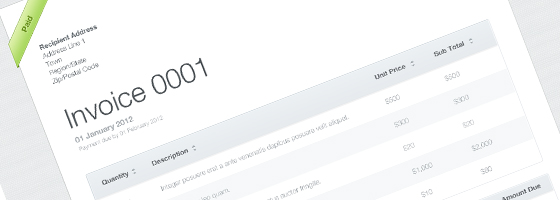
InvoiceTemplate

Invoice Template (Coded)

MyHosting
Get 50% OFF at MyHosting (Click for Coupon !!!)

Today’s freebie is an invoice template. Following our previous freebie, it was the PSD version and here comes the coded version. Pretty clean and simple. The download includes the HTML files including JS, CSS and all the images required. Feel free to use it for your online businesses or clients!

Download Now

This file has been downloaded 1090 times

HOT Offer: .com Domain Names for $0.99.


Get 43% OFF at Web Hosting Hub (Secret Link !!!)
Share on Twitter               → Share on Facebook

About the author, Oussama Afellad

I'm an 18 years old web and graphic designer. I was born in a nice city in the north of Morocco, called Tangier; The gate between Africa and Europe! My journey to get here has involved a lot of personal projects, designing and optimising clients' websites etc... As for now, I work as a freelancer, I spend my time developing a number of my clients' websites and creating templates and graphics to sell them on the envato marketplaces.

5 Comments Post a comment

  1. Pingback: un thème gratuit pour vos facture en ligne

  2. October 26, 2011 at 6:04 am

    Hi, Oussama..
    Can this code used as email template ?
    (I want to use it to send invoices via email.. something like HTML email newsletter)
    How to do it ? thanks

    · Reply
    • October 26, 2011 at 12:05 pm

      Hi there,
      It’s simple to use that, the only thing you need to do is to upload the CSS file and all the images on some website, then correct their locations in the HTML code and enjoy using it via emails :)

      · Reply
      • October 27, 2011 at 8:30 am

        How to change / switch the status between ‘draft’, ‘overdue’, ‘paid’ and ‘sent’ ?
        Should I dig and change it manually in the .css file ?

        · Reply
  3. October 27, 2011 at 10:23 am

    Okay, I get it .. I can change the status by changing HTML class..
    Sorry..

    Well, my next question is :
    “If the status is paid, then the pay button should be dissapeared automatically right ?”

    thanks Oussama

    · Reply

Leave a Reply

Your email address will not be published. Required fields are marked *

*

You may use these HTML tags and attributes: <a href="" title=""> <abbr title=""> <acronym title=""> <b> <blockquote cite=""> <cite> <code> <del datetime=""> <em> <i> <q cite=""> <strike> <strong>

Feedback

Tell us What You Think!

We appreciate any and all feedback about our blog; praise, ideas, bug reports you name it!